
XML Mod Identity version 1.0.1.3
This page contains documentation regarding creating an XML Mod Identity for your mod, which is used to package mods for release. Doing so allows all mods to be installed quickly and easily, even componentized mods, while avoiding common pitfalls of legacy “manual” installation methods.
Packaging a .sporemod
Step 1: package into a .zip file
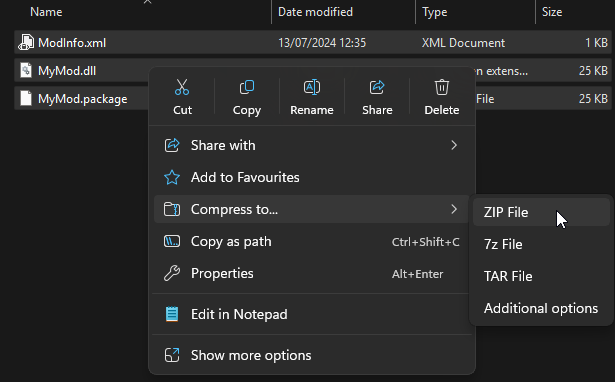
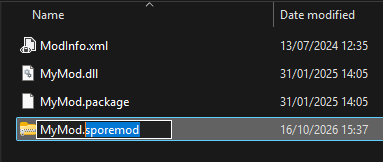
Step 2: change extension to .sporemod
Sample ModInfo.xml
<mod displayName="My Mod"
		unique="MyMod"
		description="This is an example Custom XML Installer for a hypothetical mod."
		installerSystemVersion="1.0.1.3"
		hasCustomInstaller="true"
		dllsBuild="2.5.20">
	<componentGroup unique="groupOne" displayName="This is a Group">
		<component unique="optionOne" displayName="Option one"
					description="This is an option in a component group"
					game="GalacticAdventures?GalacticAdventures"
					defaultChecked="true">OptionOneA.package?OptionOneB.package</component>
		<component unique="optionTwo" displayName="Option two" description=" "
					imagePlacement="InsteadOf" game="GalacticAdventures">OptionTwo.package</component>
		<component unique="coreUI" displayName="Core Spore UI" description=" "
					imagePlacement="InsteadOf"/>
	</componentGroup>
	<component unique="togglableComponent"
				displayName="Togglable Component"
				description="This is a togglable component. It can be enabled or disabled by the user. It is enabled by default, as defined by the defaultChecked attribute."
				game="GalacticAdventures" defaultChecked="true">ToggleComponent.package</component>
	<prerequisite game="GalacticAdventures">Component.package</prerequisite>
	<prerequisite game="GalacticAdventures">PrerequisiteFile.package</prerequisite>
</mod>
<mod> tag
The mod tag identifies the entire mod, and must be the root element of the ModInfo.xml document.
- displayName
- Name of mod shown to the user in the Spore ModAPI Easy Uninstaller, and in the mod’s Custom Installer if it has one.
- unique
- Name of mod, used by the Spore ModAPI Launcher Kit to delist old versions of the mod after an update
- version
- An optional three-digit version corresponding to the version of the mod, e.g. “1.0.0”, when no version is desired do not add this attribute
- depends
- An optional list of dependencies by the dependency mod’s unique attribute, seperated by question marks, when no dependencies are required, do not add this attribute
- dependsVersions
- An optional list of dependencies versions, seperated by question marks, when no version requirement for the dependency is required, an empty entry within the list is allowed
- description
- Explanation of the mod’s purpose and features to the user
- installerSystemVersion
- Identifies what version of the XML Mod Identity system this XML Mod Identity will use. Version 1.0.1.3 is currently in use, though existing mods which use previous versions are still supported and will continue to work and be installable. Intended for futureproofing, to allow for future changes without breaking existing XML Mod Identities
- dllsBuild
- A three-digit version corresponding to the first three digits of the minimum Build of the Spore ModAPI DLLs. This version can be found in the bottom-left corner of the Spore ModAPI Easy Uninstaller. This must be explicitly specified.
- hasCustomInstaller
- If explicitly set to true, the mod will show a configuration dialog during installation, allowing the user to select what they want among whatever components and/or componentGroups you have specified.
- isExperimental
- If explicitly set to true, the user will receive a warning, telling them that the mod is still experimental and may have undesirable side effects, along with the option to abort installation if they do not wish to proceed after learning of this. This value should generally be used for mods which are still in testing.
- requiresGalaxyReset
- If explicitly set to true, the user will receive a warning, telling them that the mod requires a Galaxy reset to take full effect, along an order to perform the Galaxy reset themselves, and the option to abort installation if they do not wish to proceed after learning of this. Many gameplay-related mods require a Galaxy reset, so be sure to test if yours is one of them.
- causesSaveDataDependency
- If explicitly set to true, the user will receive a warning, telling them that the mod will cause save data dependency, and an explanation that their save planets may become corrupted or otherwise inaccessible or be adversely affected in some other way if the mod is uninstalled, along with the option to abort installation if they do not wish to proceed after learning of this. This applies to many gameplay mods, including those which add new Simulator objects. If you’re developing such a mod, be sure to test how existing save planets fare if your mod is uninstalled.
<prerequisite> tag
The prerequisite tag identifies a mandatory part of your mod. Content specifies the names of the files in your mod which are to be installed (separated by question marks).
- game
- Controls where the prerequisite’s file(s) are to be installed. Unspecified or invalid values are treated as referring to the ModAPI Launcher Kit folder, e.g. for ModAPI DLLs. Alternative values are “GalacticAdventures” for Spore Galactic Adventures Data folder, “Spore” for Core Spore Data folder. Value should have the same number of entries as the filenames, again separated by question marks.
<compatFile> tag
The compatFile tag adds files only if certain other files are already installed. Content specifies the names of the files in your mod which are to be installed if the target files are found (separated by question marks).
- compatTargetFileName
- Defines the names of the the compatFile’s source file(s)
- compatTargetGame
- Controls where the compatFile’s source file(s) are expected to be. Unspecified or invalid values are treated as referring to the ModAPI Launcher Kit folder, e.g. for ModAPI DLLs. Alternative values are “GalacticAdventures” for Spore Galactic Adventures Data folder, “Spore” for Core Spore Data folder. Value should have the same number of entries as the filenames, again separated by question marks.
- game
- Controls where the compatFile’s target file(s) are to be installed. Unspecified or invalid values are treated as referring to the ModAPI Launcher Kit folder, e.g. for ModAPI DLLs. Alternative values are “GalacticAdventures” for Spore Galactic Adventures Data folder, “Spore” for Core Spore Data folder. Value should have the same number of entries as the filenames, again separated by question marks.
<component> tag
Only used if the mod’s hasCustomInstaller attribute is explicitly set to true. The component tag identifies an optional component of your mod. Content specifies the names of the files in your mod which are to be installed (separated by question marks).
- displayName
- Name of component shown to the user in the mod’s installer
- unique
- Name of component used internally to track which features are enabled during reconfiguration and upgrades
- game
- Controls where the component’s file(s) are to be installed. Unspecified or invalid values are treated as referring to the ModAPI Launcher Kit folder, e.g. for ModAPI DLLs. Alternative values are “GalacticAdventures” for Spore Galactic Adventures Data folder, “Spore” for Core Spore Data folder. Value should have the same number of entries as the filenames, again separated by question marks.
- description
- Explanation of the component’s purpose and effects to the user. If the description does not fit into the window, autoscrolling will be used to allow the user to see it in its entirety.
- imagePlacement
- Controls the position of an image associated with the component’s description. Specify an image by including it in your .sporemod with a filename matching the component’s unique. Default value is “None”, which does not display an image at all. Additional values are “Before”, which displays the image above the description text, “After”, which displays the image below the description text, and and “InsteadOf”, which displays only the image, with no text visible at all. If the image does not fit into the window, autoscrolling will be used to allow the user to see it in its entirety.
<componentGroup> tag
Only used if the mod’s hasCustomInstaller attribute is explicitly set to true. The componentGroup tag identifies a group of mutually-exclusive optional components of your mod. Children must be components.
- displayName
- Name of componentGroup shown to the user in the mod’s installer
- unique
- Name of componentGroup used internally to track which features are enabled during reconfiguration and upgrades
Version history
- 1.0.1.3
- Added
depends,dependsVersionsandversionattributes to <mod> tag
- Added